Clos Fabric Lab Series
This README starts with the implemented Lab 1 and records the planned direction for the next labs. The sequence is meant to move from a pure routed underlay to failure detection, toy dynamic load balancing, multi-tenant overlays, and then BGP unnumbered.
Lab Roadmap
Section titled “Lab Roadmap”| Lab | Title | Status | Focus |
|---|---|---|---|
| Lab 1 | Pure eBGP Clos Underlay and ECMP Failure Behavior | Implemented here | RFC 7938-style eBGP underlay, /31 links, ECMP, failure tests |
| Lab 2 | BFD + DLB-like Linux ECMP Weight Controller | Planned | BFD-assisted convergence and a toy controller that adjusts Linux ECMP weights from uplink counters |
| Lab 3 | EVPN-VXLAN Overlay with cEOS-lab | Planned | Replace the FRR-only lab with cEOS-lab, add VXLAN overlay, EVPN control plane, and multi-tenant L2/L3 services |
| Lab 4 | BGP Unnumbered Underlay (RFC 5549) | Planned | Remove the fabric link IPv4 plan by using IPv6 link-local next-hops for IPv4 NLRI |
Lab 2 is intentionally a simulation, not real ASIC DLB. FRR and Linux can show the control loop idea by changing ECMP next-hop weights, but they do not implement hardware flowlet switching. Any future eBPF experiment should stay scoped to lab interfaces and include cleanup for tc qdiscs and filters.
Lab 1: Pure eBGP Clos Underlay and ECMP Failure Behavior
Section titled “Lab 1: Pure eBGP Clos Underlay and ECMP Failure Behavior”2-spine x 4-leaf Clos fabric on FRR + containerlab. Lab 1 implements the canonical hyperscale DC underlay pattern from RFC 7938: per-device private 2-byte ASNs, routed /31 P2P links, eBGP-only control plane, ECMP across both spines, no IGP, and no L2 fabric.
What This Lab Proves
Section titled “What This Lab Proves”- 8 eBGP sessions come up:
4 leaves x 2 spines. - Each leaf learns remote leaf loopbacks and host subnets through both spines.
- leaf-to-leaf and host-to-host reachability survives one spine path failure.
- ECMP shrinks to one next-hop during failure and expands back to two after recovery.
- Leaves advertise only their own loopback and host subnet, so they do not become transit between spines.
Prerequisites
Section titled “Prerequisites”- Linux host with Docker
- containerlab >= 0.55
- just optional, but recommended
- ~2 GB RAM, ~2 GB disk for images
# install containerlab (official one-liner)bash -c "$(curl -sL https://get.containerlab.dev)"
# pull images up front (or run `just pull`)docker pull quay.io/frrouting/frr:9.1.0docker pull nicolaka/netshoot:latest
Quick Start
Section titled “Quick Start”cd clos-ebgp-labjust up # pull -> deploy -> wait 25s -> verifyjust bgp-summary # BGP state on all routersjust ping-mesh # host-to-host reachability matrixjust destroy # tear downRun just with no args to see every recipe.
Topology
Section titled “Topology” AS 65000 AS 65001 ┌────────┐ ┌────────┐ │ spine1 │ │ spine2 │ │.0.0.101│ │.0.0.102│ └─┬┬┬┬───┘ └─┬┬┬┬───┘ ││││ ││││ ┌──────┘│││└──────┐ ┌─────┘│││└─────┐ │ ┌─────┘│└─────┐ │ │ ┌────┘│└────┐ │ │ │ │ │ │ │ │ │ │ │ ┌─┴─┴┐ ┌──┴┴─┐ ┌──┴─┴┐ ┌─┴─┴┐ │leaf1│ │leaf2│ │leaf3│ │leaf4│ each leaf peers with both spines │65011│ │65012│ │65013│ │65014│ └──┬──┘ └──┬──┘ └──┬──┘ └──┬──┘ │ │ │ │ host1 host2 host3 host4 10.11.0.10 .12 .13 .14Containerlab’s graph view (just graph) renders the same fabric visually:
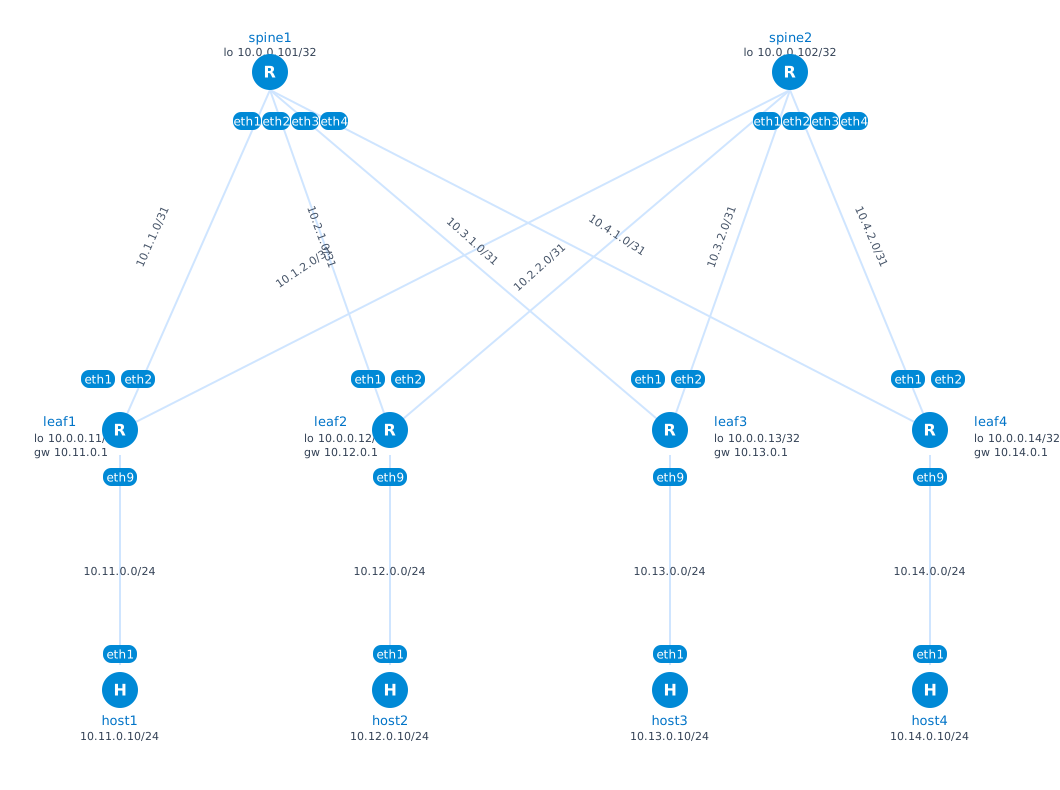
Addressing
Section titled “Addressing”| Element | Address |
|---|---|
| spine1 lo | 10.0.0.101/32 |
| spine2 lo | 10.0.0.102/32 |
| leafN lo | 10.0.0.1N/32, N=1..4 |
| leafN <-> spine1 | 10.N.1.0/31, leaf=.0, spine=.1 |
| leafN <-> spine2 | 10.N.2.0/31, leaf=.0, spine=.1 |
| leafN host net | 10.1N.0.0/24, gw=10.1N.0.1, host=10.1N.0.10 |
ASN Plan
Section titled “ASN Plan”| Node | ASN |
|---|---|
| spine1 | 65000 |
| spine2 | 65001 |
| leaf1 | 65011 |
| leaf2 | 65012 |
| leaf3 | 65013 |
| leaf4 | 65014 |
Per-leaf and per-spine ASNs make AS_PATHs easy to inspect and keep loop avoidance native: a leaf rejects paths where its own ASN reappears.
Bring Up and Inspect
Section titled “Bring Up and Inspect”sudo containerlab deploy -t clos.clab.yml # or: just deployjust wait 25Containerlab prints the node table and management IPs. To enter a router:
docker exec -it clab-clos-ebgp-leaf1 vtysh # or: just vtysh leaf1leaf1# show bgp ipv4 unicast summaryleaf1# show ip routeUseful one-shot commands:
just vc leaf1 "show ip route 10.0.0.13/32" # route to leaf3 loopbackjust bgp leaf1 10.0.0.13/32 # BGP paths for leaf3 loopbackjust routes leaf1 # full RIBjust counters leaf1 # eth1/eth2 byte countersVerify
Section titled “Verify”sudo bash scripts/verify.sh # or: just verifyQuick checks:
just bgp-summary # BGP summary on every routerjust ecmp # leaf1 -> remote leaf loopback ECMP checksjust route-count # BGP-installed route count per leafjust ping-mesh # host1..host4 reachability matrixExpected Results
Section titled “Expected Results”-
8 eBGP sessions total. This is
4 leaves x 2 spines. There are no extra validation BGP sessions. Spine summaries show four neighbors each; leaf summaries show two neighbors each. Do not double-count the same session from both ends. -
All sessions Established. Spines should show four leaf neighbors with a numeric
State/PfxRcd; leaves should show two spine neighbors with a numericState/PfxRcd.Idle,Active, orConnectmeans the session is not up. -
2-way ECMP installed. On leaf1, the route to leaf3 loopback should have two FIB next-hops:
show ip route 10.0.0.13/32* 10.1.1.1, via eth1* 10.1.2.1, via eth2eth1is the spine1 uplink andeth2is the spine2 uplink. -
Correct AS_PATHs.
just bgp leaf1 10.0.0.13/32should show two paths:65000 6501365001 65013These are the spine1 and spine2 paths to leaf3. There should not be another leaf ASN in the middle.
-
Host reachability.
host1 -> host3andhost2 -> host4should report0% packet loss. -
Route count. Each leaf should report
8 BGP routes installed: three remote leaf loopbacks, three remote host subnets, and two spine loopbacks.
If vtysh prints % Can't open configuration file /etc/frr/vtysh.conf, the lab was likely deployed before configs/vtysh.conf was bind-mounted. It is cosmetic; just redeploy removes the warning.
Reading show ip route on leaf1
Section titled “Reading show ip route on leaf1”A healthy route table on leaf1 has four kinds of routes:
C>* 10.0.0.11/32: leaf1’s own loopback, directly connected onlo.C>* 10.1.1.0/31andC>* 10.1.2.0/31: directly connected P2P uplinks to spine1 and spine2.B>* 10.0.0.12/32,10.0.0.13/32,10.0.0.14/32: remote leaf loopbacks learned via BGP, with two ECMP next-hops.B>* 10.12.0.0/24,10.13.0.0/24,10.14.0.0/24: remote host subnets learned via BGP, also with two ECMP next-hops.
The management route K>* 0.0.0.0/0 via 172.20.20.1 and connected 172.20.20.0/24 are containerlab management-network routes, not fabric routes.
Reading verify.sh Output
Section titled “Reading verify.sh Output”The script checks control plane first, then data plane:
- Spine BGP summaries. Each spine should list four leaf neighbors. With the current
LOCAL-ONLYleaf export policy, each leaf advertises only two local prefixes to each spine: its loopback and host subnet. - Leaf BGP summaries. Each leaf should list two spine neighbors. A leaf should receive seven prefixes from each spine: three remote leaf loopbacks, three remote host subnets, and the attached spine’s loopback.
- Full BGP table on leaf1. Remote leaf loopbacks and host subnets should have two paths, one through each spine.
- Spine loopbacks.
10.0.0.101/32should be reachable through spine1 and10.0.0.102/32through spine2. Extra non-best paths such as65001 65014 65000indicate the old pre-LOCAL-ONLYpolicy is still running; redeploy the lab. - Traceroute. Repeated traceroutes may still take the same spine because ECMP is flow-hash based. Use
iperf-parallelplusjust counters leaf1for a clearer view of load sharing.
Failure Scenarios
Section titled “Failure Scenarios”sudo bash scripts/failure-test.sh # or: just failure-testThe script exercises two cases:
- A single link failure:
leaf1:eth1down, which removes the leaf1-spine1 path. - A spine fabric isolation: all spine1 fabric-facing links
eth1-eth4down.
With timers bgp 3 9, link-down convergence should complete in single-digit seconds. Silent peer failures where links stay up, such as a frozen routing process, converge near the hold timer unless BFD is enabled.
Reading failure-test.sh Output
Section titled “Reading failure-test.sh Output”-
Baseline. leaf1 should have two next-hops to leaf3 loopback:
* 10.1.1.1, via eth1* 10.1.2.1, via eth2 -
Single-link failure. After
leaf1:eth1goes down, the spine1 neighbor moves toActive, spine2 remainsEstablished, and the route collapses to the surviving spine2 next-hop only:* 10.1.2.1, via eth2 -
Single-link recovery. When
leaf1:eth1comes back, BGP re-establishes and ECMP returns to two next-hops. -
Ping-loss summary. If
Loss percentage:is empty, the background ping has not printed its final summary yet. That is a script timing artifact, not a forwarding failure; the packet replies above it show live traffic. -
Spine1 fabric isolation. When spine1’s fabric links go down, leaf1 keeps the spine2 session and host traffic still succeeds through spine2.
-
Fabric recovery. When spine1’s links return, the spine1 BGP session comes back to
Establishedand the route to10.0.0.13/32again shows botheth1andeth2.
Exercises
Section titled “Exercises”1. Enable BFD to bring detection under a second
Section titled “1. Enable BFD to bring detection under a second”The justfile applies BFD at runtime across all 8 eBGP sessions:
just failure-test # baseline: BGP timers onlyjust bfd-on # 300ms detection on every sessionjust bfd-status # confirm peers are upjust failure-test # compare behaviorjust bfd-off # roll backRelevant FRR snippets:
neighbor 10.1.1.1 bfdbfd peer 10.1.1.1 receive-interval 100 transmit-interval 100 detect-multiplier 3The default failure script uses ip link set dev eth1 down, which signals the failure via netlink; BGP tears down quickly even without BFD. BFD is more useful for silent failures where the link stays up but control-plane packets stop. To try that:
docker kill -s STOP clab-clos-ebgp-spine1 # freeze process; links stay up# without BFD: hold timer expiry is around 9s# with BFD: detection is around 300msdocker kill -s CONT clab-clos-ebgp-spine1 # restore2. Observe ECMP Polarization
Section titled “2. Observe ECMP Polarization”just iperf-parallel # 8 flows, host1 -> host3; should spread across uplinksjust iperf-single # 1 flow, host1 -> host3; hashes to one uplinkWatch leaf1 counters in another pane:
just counters leaf1# or live:docker exec clab-clos-ebgp-leaf1 \ sh -c "watch -n1 'ip -s link show eth1; ip -s link show eth2'"The single-flow case demonstrates ECMP polarization: one elephant flow hashes to one uplink while the other idles. The sibling lab glb-nnhn-bgp-underlay builds on this motivation.
3. Add a Third Spine
Section titled “3. Add a Third Spine”Add a spine with ASN 65002 and P2P plan 10.N.3.0/31. Each leaf needs only a new uplink and new spine neighbor stanza; no leaf-to-leaf configuration changes.
4. Break Multipath Intentionally
Section titled “4. Break Multipath Intentionally”Remove bgp bestpath as-path multipath-relax from a leaf and re-check show ip route. Only one path remains. This is a common BGP Clos config bug.
Cleanup
Section titled “Cleanup”sudo containerlab destroy -t clos.clab.yml --cleanup # or: just destroyjust clean # remove state dir afterwardsclos.clab.yml # topologyconfigs/<node>/frr.conf # per-node BGP configconfigs/<node>/daemons # FRR daemon enable listconfigs/vtysh.conf # vtysh startup configscripts/verify.sh # end-to-end checksscripts/failure-test.sh # link/fabric failure exercisesjustfile # task runner; see `just --list`assets/clos-ebgp-topology.svgRecipe Map
Section titled “Recipe Map”| Group | Recipes |
|---|---|
| Lifecycle | pull, deploy, destroy, redeploy, up, status, graph, clean, lint |
| Verification | verify, bgp-summary, ecmp, route-count, ping-mesh |
| Failure | failure-test, bfd-on, bfd-off, bfd-status |
| Per-node interactive | vtysh <n>, sh <n>, vc <n> <cmd>, routes <n>, bgp <n> <prefix> |
| Traffic | ping <src> <dst>, trace <src> <dst>, iperf-single, iperf-parallel, counters <n> |
| Inspection | logs <n>, tcpdump <n> <iface>, reload <n> |
Design Notes
Section titled “Design Notes”- Per-spine ASN. Shared-ASN-per-tier is simpler, but per-spine ASN keeps path identity visible in AS_PATH and avoids
allowas-inon leaves. - Explicit leaf
networkstatements. Leaves advertise only intended local prefixes: loopback and host subnet. - Spine
redistribute connectedwith filtering. Spines advertise only their loopbacks; fabric links do not need to be globally reachable. - Leaf
LOCAL-ONLYexport policy. Leaves accept routes from both spines but do not re-advertise spine-learned routes back to another spine. no bgp default ipv4-unicast. AF activation is explicit.- Aggressive lab timers.
timers bgp 3 9is useful for demos. Production fabrics commonly use default timers plus BFD. - Runtime-only BFD.
just bfd-ondeliberately skipswrite memory, so BFD disappears onjust redeploy. Persist it by editingconfigs/*/frr.conf.